TextArc
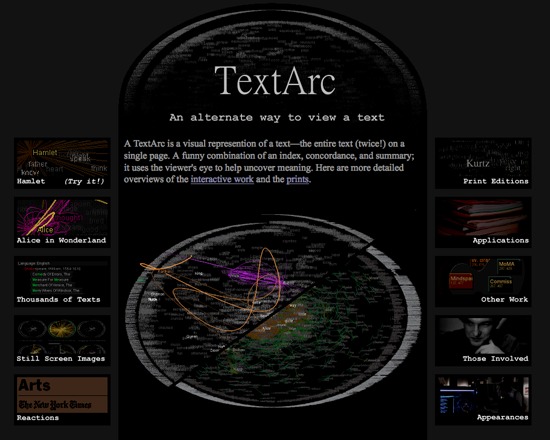
TextArc is a free visualization tool that represents an entire text on a single page. It has elements of an index, concordance and summary all in one place, encouraging the viewer to use its juxtapositions to uncover meaning. The web-based applet is preloaded with thousands of text collected from Project Gutenberg. Note: TextArc was designed for browsers circa 2002 and requires Java SE 6 to run.
Documentation
Creator(s): W. Bradford Paley
Creator's Site: http://www.textarc.org/
Creator's Email: brad@didi.com
Repository:
Attributes
- Type of analysis: Visualization Analysis
- Type of license: Free
- Background Processing: Not Applicable
- Web Usable: Run in Browser
- Ease of Use: Easy
- Historic Tool (developed before 2005): Influential Development sustained to present
- TaDiRAH Goals: Analysis
- TaDiRAH Methods: Other (analysis) Visualization
List this tool appear on
Rating
Suggested Tools
Comments
TextArc is a free Java applet combining visualization with elements of an index, concordance and summary. It is a simple and intuitive way to delve into a text, and includes a guide accompanied by screenshots. TextArc is unique amongst text analysis tools for the awards and recognition it has earned for the artistic merits of its text visualization.
Though no longer under development, TextArc has been maintained online since 2002. It requires a 600 Mhz Pentium II or faster, running a minimum of Windows NT or Mac OS X, Java SE 6 or more recent, and a current web browser; as such, most modern computers will be able to run this tool with minimal difficulty though it can be slow and is processor-intensive.
TextArc offers a simple, clever way to examine a text. It takes a text, located by the user in the tool's provided Project Gutenberg search, and generates a circular representation in which the entirety of the text is arranged in sequence around the exterior. Each word in the text also appears in the centre of the visualization, its location determined by its frequency and at what points it shows up in the text. Other texts cannot be used with TextArc at this time.
The most common words will appear in the centre and less common drawn toward the part of the edge it appears most frequently. Words are also brighter or darker accordingly. Hovering over a word reveals lines connecting that word to each place it appears along the arc or a looping line connecting words in the order they appear in the text. TextArc also includes concordance and association list functions. For a dynamic view of the text, users can run the Read function, which highlights each word in sequence to show where it appears in relation to other words and its distribution through the text all in one smooth animation.
Though this tool stands up well even a decade later, texts larger than a short novel, such as the example texts Alice in Wonderland and Hamlet, will slow down the tool dramatically and can even cause it to crash on the Read function. When used on a laptop, the strain TextArc puts on the processor can cause the computer to rapidly overheat; reviewing its functions required several pauses to allow heat to dissipate. As such, TextArc is best run on a desktop computer.
TextArc is recommended as a way to gain simple insights into a text quickly and attractively without getting bogged down in statistical data from the start. It offers a means of intuitively delving into word choice and distribution particularly useful as a prelude to applying more complex or comprehensive tools to the text. It would be additionally useful as a didactic tool in the classroom, for example to show how characters and thematically loaded words come and go over the course of a work of fiction. Though minimalist in its functions, TextArc remains useful and attractive. It has earned a place as historically important tool for both its text analysis capabilities and its contributions to text visualization.
The page cannot be found, but we can see a capture of this website from the wayback machine
https://web.archive.org/web/20180410215351/http://www.textarc.org/