SIMILE Widgets: Welkin
- Last Updated: 10/26/2018 12:00:00 AM
- Site: http://simile.mit.edu/welkin/
Welkin is a free tool for visualizing complex RDF models offered for download by the SIMILE Project. Rather than permitting users to focus on specific nodes, it provides analytical views such as an overview of a dataset's connectivity or potential mappings between resources and ontologies. It runs best through Java WebStart and is compatible with Windows, OS X and Linux.
Documentation
Creator(s): Stefano Mazzocchi, Paolo Ciccarese
Creator's Site: http://simile.mit.edu/welkin/
Creator's Email:
Repository:
Attributes
- Type of analysis: Visualization RDF Analysis
- Type of license: Free Open Source
- Background Processing: Runs in Background
- Web Usable: Software you Download and Install
- Ease of Use: Easy
- Warning: Still in Development
- Tool Family: SIMILE Widgets
- TaDiRAH Goals: Analysis
- TaDiRAH Methods: Visualization
List this tool appear on
Rating
Suggested Tools
Comments
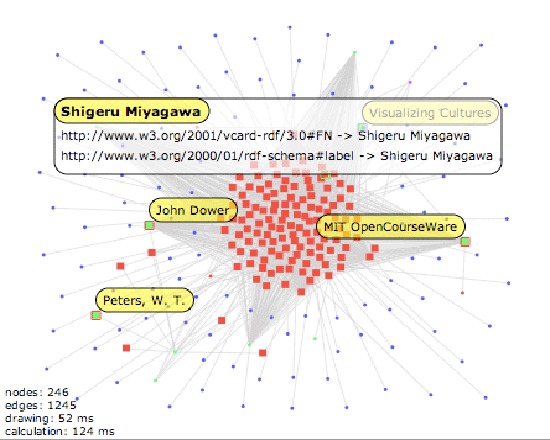
Welkin is a free open source graph – based RDF visualizer created by the SIMILE project and originally written by Stefano Mazzocchi and Paolo Ciccarese. Welkin serves as a \"telescope\" for the RDF data. It lets you understand global shape and cluster characteristics of the data rather than just a single RDF statement. It allows not only graphical representation of subject, object and predicate, but also more interactive exploration of the graph.
The program caters to data and metadata analysts who need to see connectivity within a particular dataset within the whole. Generally speaking Welkin helps analysts to get the mental model of a dataset. The options for manipulation with RDF data visualization are available. Welkin offers different functions for the work with predicates, resources and charts. To be more specific the program shows each predicate contained in the loaded RDF model and grouped by their URI common prefixes and tokens as well as two widgets associated with each of them.
Welkin is fast with immediate interactivity. Welkin’s developers position interactivity as a crucial component for understanding complex data models. In its developers’ view it’s much harder to do panning and zooming on statistically drawn graphs and that’s why Welkin’s interactivity is a definite advantage for analysts.
Welkin’s visualization represents RDF statements as dots and lines. With the effort to reduce clutter developers built visualization in a way that smaller dots represent objects while larger dots stand for those resources that were used at least once as a subject. Developers explain such visualization choice by the fact that “object nodes are normally more numerous and, in the sense, that they are just referenced by the loaded model, as only subject nodes are actually described in the mode.”
Developers strive to achieve efficiency both in performance and visualization. Despite the fact that there can be two different predicates between the same resources Welkin displays only one of them in one line. As it mentions the website Welkin’s team is currently designing the options to be able to display multiple predicates on the graph as well as allow mouseover – like effects to visualize the predicate values in the future. Although RDF models can be directed Welkin works with direction arrows of the predicates turned off to increase operational efficiency.
Welkin's developers recommend running Welkin through Java WebStart (to install Java WebStart you’ll need first to get the latest version of the Java Runtime Environment from the official website of Java). Omitting slightly complicated process of downloading and running the program in general Welkin has a good set of functions for metadata analysts working with complex data models. The possibility of working with multiple predicates makes this tool especially good.