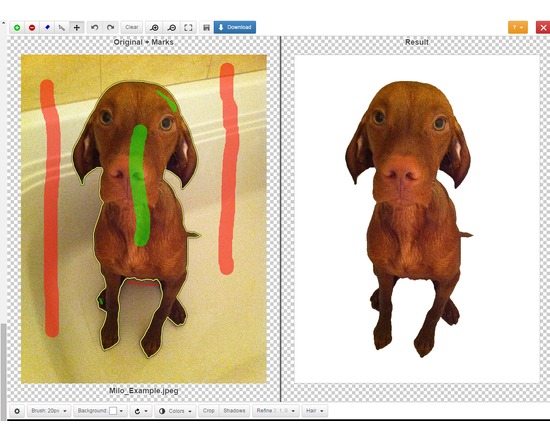
Clipping Magic lets you easily edit out the background of photos. Mark up the foreground and background in the editor, use the scalpel tool for precision selections, then download the new image. You can upload and edit as many images as you like but you must have a paid subscription to download ($4 - $15 per month depending on the number of download credits needed).
Officially supported file formats: JPEG, PNG, GIF images using sRGB color space. CMYK displays the wrong colors in the editor but the resulting image is correct. Current max image resolution is 4 megapixels. The Clipping Magic website includes tutorials for each of their tools.
Feature List:
Web based graphical user Interface, with quick feedback on your edits.
Smart Algorithm minimizes the amount of work you need to put in - you do not need to trace the entire outline of your image
Pan and Zoom to any level necessary allows you to inspect details while quickly navigating your image.
Undo / Redo
Auto-Save
Configurable Auto-Brush-Size: The brush size adapts dynamically to your zoom level so that you can easily zoom in to make detailed edits.
Refine Edges gives you full control over smoothing, feathering and offset.
Dedicated Hair Tool separates out hair from clean and distinct backgrounds.
Color Levels - tune brightness, shadows and highlights, and the color temperature.
Rotate / Straighten.
Crop & Resize
Shadows creator with both drop shadow and ellipse shadows.
Background Color or transparent background options
Configurable Defaults
Bulk Clipping
Share Your Results with a secure URL
They also offer a paid REST-oriented Web API for automating the uploading of images and downloading results. Subscriptions range from $50 to $250 per month.The editor can be integrated into a website using ClippingMagic.js