Comparator - HTML (TAPoRware)
This tool compares two documents by comparing the words in each according to user specifications. XML and plain text versions are also available in the TAPoRware toolsets.
This tool’s functionality has been incorporated into Voyant available online at www.voyant-tools.org
Documentation
Creator(s): Geoffrey Rockwell et. al.
Creator's Site: http://geoffreyrockwell.com/
Creator's Email: grockwel@ualberta.ca
Repository:
Attributes
- Type of analysis: Search Visualization Collaboration Natural Language Processing Publishing RDF
- Type of license: Free
- Web Usable: Run in Browser
- Ease of Use: Moderate
- Warning: Prototype
- Tool Family: TAPoRware
- Historic Tool (developed before 2005): Influential
- TaDiRAH Goals: Capture Creation
- TaDiRAH Methods: Annotating Archiving Cleanup Collaboration
List this tool appear on
Rating
Suggested Tools
Comments
Comparator (HTML) is a free, web-based tool designed to run in a browser window. It is easy to use, designed to compare the text of two documents, either hosted at a web address or uploaded from the user's files.
Users may set the comparison criteria. Options include all words, words matching a pattern, words in or excluded from a user-specified list, or excluded from the Glasgow stop word list. Words can also be restricted by XML elements. Searching a pattern rather than a word requires skill with regular expressions and is thus not accessible to all users.
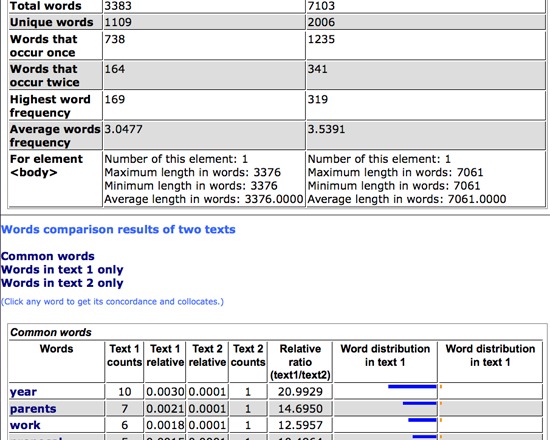
Other features include options to sort by the first text’s word count or ratio of relative word count, and to display as HTML or a tab delimited text. The HTML output gives several tables of information about the texts, including basic information about the texts, a word comparison, words in the first text, and words in the second. Any of the words in the word comparison table may be clicked to produce a concordance for that word.
This tool has a few problems. When the tab delimited output is selected, the tool may not process some characters correctly; please see List Words (Plain Text) for examples. In addition, punctuation like open quotes and long dashes are often appended to the adjacent word, skewing the counts and comparison.
Despite these issues, Comparator (HTML) is an effective way to make a comparative analysis of two texts. Versions are also available for XML and plain text documents.